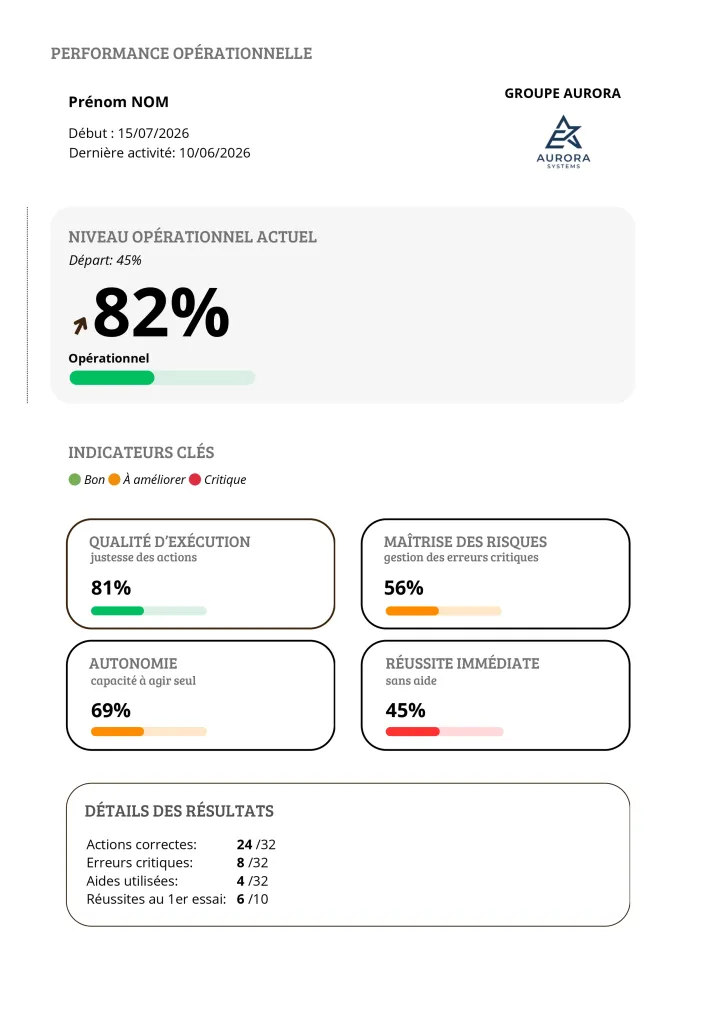
Execution quality
Are the right actions being taken?
Share of decisions matching the expected procedure across every control point in the scene.
A signed attendance sheet proves someone was there. It says nothing about their ability to act correctly when the situation tightens. Soriston produces that second piece of information, learner by learner and site by site.
Every interaction inside a 360° scene leaves a usable trace. Soriston records the decision taken, how long it took, which elements were explored beforehand, whether help was used, and whether the first attempt succeeded.
This data is not there to monitor people. It answers a question most training managers cannot settle today: who is genuinely capable, and of what.
Each one answers a precise question a manager or quality lead actually asks.
Are the right actions being taken?
Share of decisions matching the expected procedure across every control point in the scene.
Are serious errors avoided?
Separate tracking of critical errors, the ones carrying a real safety, health or commercial consequence.
Can the person act unaided?
How often contextual hints and help offered inside the module are used.
Is the gesture acquired or still hesitant?
The indicator closest to the reality of the job, where second chances are rare.
Is the level genuinely moving?
Gap between starting level and current level, session after session, on the same situation.
Where does the team stand overall?
Share of validated scenarios by learner, team, site and topic.
The same data serves three different purposes. Each person sees what they need, and nothing more.
At the end of a module they review their decisions, understand what was missing and know what to redo. The debrief is individual and never comparative.
They see team level by topic, spot who needs support and on exactly which point, without relying on gut feeling.
Consolidated view by site, region and role. Gaps between locations become visible before the audit, not after.
Every learner gets an operational performance sheet that fits on one page and reads in thirty seconds.
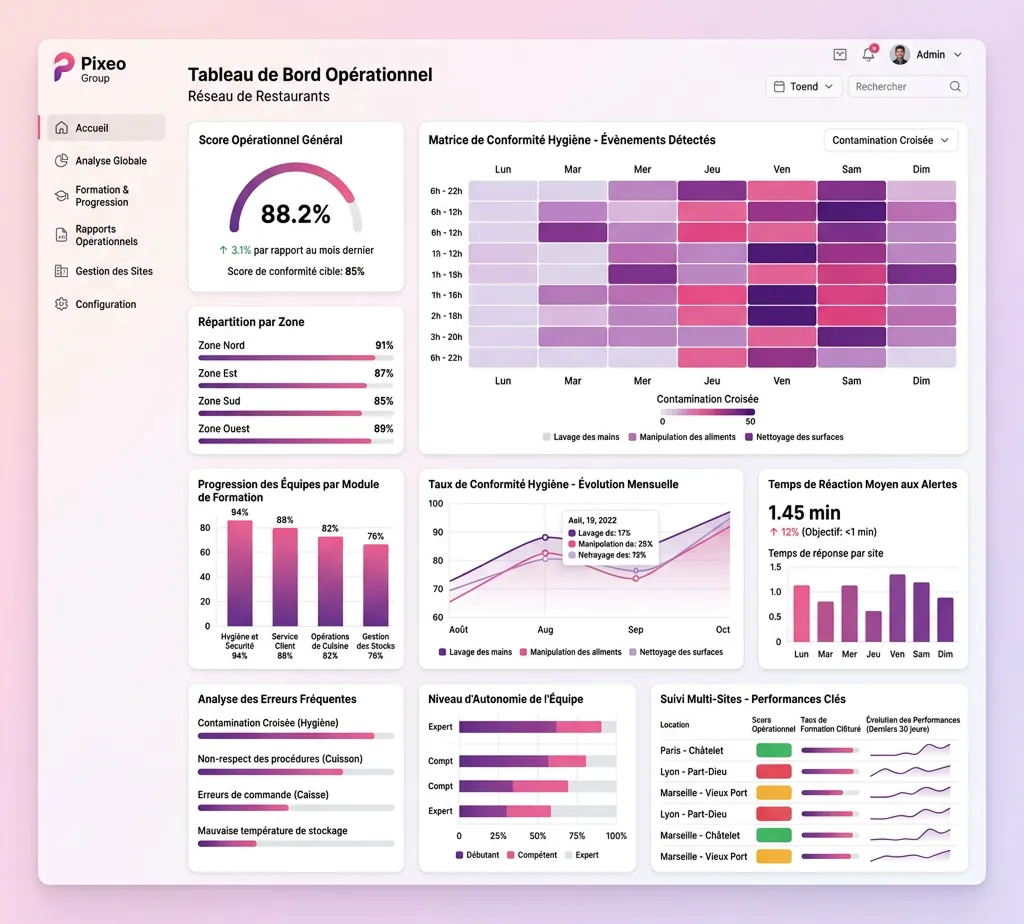
For networks, the aggregated reading matters as much as the individual sheet. The dashboard brings together compliance scores, progress by module, the most frequent errors and average reaction time to alerts.
Learner results are personal data. They are hosted in the European Union and processed in line with the GDPR. You remain the data controller, Pixeo Group acts as processor under article 28.
The data supports assessment and training management. Any disciplinary use falls under your internal policy and must be framed by your company agreements and by informing employee representatives.
No. Each learner only accesses their own debrief. Comparative views are restricted to manager and administrator profiles.
Yes, as a spreadsheet for team reports and as PDF for individual sheets. Exports work in a quality file, a performance review or an audit response.
They are stored locally on the device and synced automatically when the connection returns. The learner does nothing, and nothing is lost if the app is closed in between.
The retention period is configurable and set contractually with you, in line with your training evidence obligations. By default, detailed results are kept for three years.
Yes, through export or an application interface depending on your tool. The aim is for operational level to land where you already manage learning paths, with no double entry.
We run a short demonstration on a scenario close to your own operations. You judge from there.
About 20 minutes. No commitment, nothing to install beforehand.